
Do you ever get kind of annoyed when something new comes out that’s supposed to help you? It’s just another thing you have to figure out when everything is working fine. Oh, that’s me this week. And Model Context Protocol, or MCP, is the tech du jour. So I wanted to figure out why everybody’s talking about it.
I think what made it real for me was when I was talking to a product manager about integrations, and I was saying, “Oh, of these three products, this one has the least amount of integrations, and therefore, you know, customers won’t want to use it as much because it’s not as useful.” And he said, “Well, in the era of MCP, that’s a moot point.” I said, “Okay, like why?” And so I wanted to unpack that a little bit and, uh, yeah, here we go.
So we’ll start off with what is MCP—how it’s being used in your toolkit today already. You don’t even realize it. And then, you know, as a GTM professional, if you’re working at a company, do you have MCP? How should you be positioning it? Should you be working on it, thinking about it, etc.? So here we go.
Why MCP matters now
SaaS applications—especially AI-powered ones—are no longer valuable just because of what model they use, but because of what they can connect to:
Business systems (CRM, ticketing, docs, repos)
SaaS tools (Slack, Jira, GitHub, Google Drive)
Internal APIs and proprietary data
Real-time actions (create ticket, approve expense, deploy code)
LLMs without integrations are smart but blind. MCP exists to solve that gap in a standardized “easy button” way.
Before MCP
Every integration was bespoke
Each assistant hardcoded adapters
Tool schemas, auth, and error handling were inconsistent
High friction → fewer integrations
With MCP
If a third-party app exposes an MCP server:
Tools are described in a standard way
Inputs/outputs are typed and self-describing
Capabilities are discoverable at runtime
Platforms like enterprise assistants can integrate much faster
So —integrations become first-class citizens, not custom projects.
MCP examples in your GTM day-to-day
✅ Clay
How Clay uses MCP:
Clay has built (or partnered on) an official MCP server that exposes core CRM functionality—things like searching contacts, pulling interaction history, contact stats, and creating/updating records—via the MCP interface. This effectively lets AI assistants (e.g., Claude, ChatGPT with MCP support) directly query and manipulate your Clay data through natural language.
What that means in practice:
Instead of manually exporting contact lists or writing API code, an AI model connected via MCP can fetch relevant contacts or generate insights for you.
A model like Claude or ChatGPT can treat Clay as a tool it can call, just like any other external service.
This aligns with MCP’s goal of reducing custom wrappers and letting agents use structured tool knowledge without bespoke connectors.
✅ Lovable
How Lovable uses MCP:
Lovable integrates MCP to connect its AI assistant with external team tools and data sources, letting the AI pull context like tickets, docs, issues, and specs from systems like Notion, Jira, etc., without separate custom integrations.
Specifically:
Lovable has built built-in personal MCP connectors that act like adapters to third-party systems.
When Lovable’s agent needs context—say project specs from Notion—that connector exposes relevant data via MCP to the model.
On paid plans users can also deploy custom MCP servers to hook up any unsupported service.
Why this matters for Lovable users:
It lets the AI generate more accurate prototypes, suggestions, and automation because it’s reading real team context instead of guessing based on training data.
✅ Anthropic
How Anthropic uses MCP:
Anthropic is the originator of the Model Context Protocol — they designed MCP to standardize how AI systems connect to external tools and data sources.
In their products:
MCP is used to let agents like Claude access real-time data and connected services securely, similar to how a developer would use an API.
Anthropic’s own reference MCP servers cover things like file systems, enterprise services (Google Drive, Slack, GitHub, etc.).
Latest updates include MCP Apps, which let external tools show interactive UI inside model contexts (not just back-end calls).
Broader ecosystem role:
Anthropic actively donates MCP to the Agentic AI Foundation, helping position it as an open standard that everyone — including direct competitors — can adopt.
✅ OpenAI
How OpenAI uses MCP:
Although OpenAI didn’t create MCP, they have officially adopted it across multiple products — including the ChatGPT desktop app, the Agents SDK, and the Responses API. This means OpenAI’s AI systems can discover and call MCP tools the same way other agent frameworks do.
What this looks like in real use cases:
AI tools inside ChatGPT can connect to remote MCP servers (e.g., HubSpot’s or third-party MCP servers) to fetch data and perform operations.
OpenAI’s involvement in the Agentic AI Foundation alongside Anthropic shows a broader commitment to standard, interoperable agent tooling.
✅ HubSpot
How HubSpot uses MCP:
HubSpot built a Remote MCP Server that exposes CRM data (contacts, interactions, company records, etc.) and actions to AI agents via MCP. They specifically highlight using this to integrate with ChatGPT without requiring local installs or manual configuration.
What each does with MCP
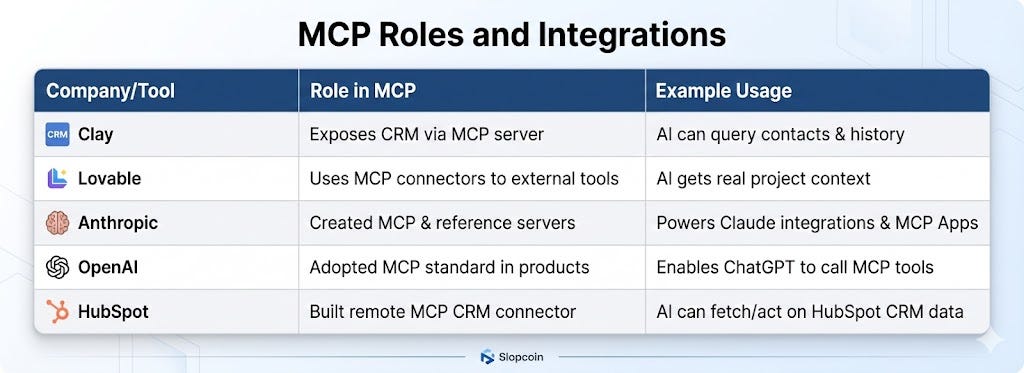
MCP concepts a SaaS GTM leader should understand (no engineering fluff)
1. MCP = agent-native integration
Traditional integrations are app-to-app
MCP integrations are agent-to-capability
The “user” becomes an AI assistant acting on the customer’s behalf
Why this matters to you:
Your product shows up inside ChatGPT / Claude / copilots
You don’t need a custom deal per AI platform
2. MCP servers = capability access points for your SaaS
Think less:
“We integrate with HubSpot”
Think more:
“We expose
create_campaign,analyze_pipeline,enrich_leadas callable capabilities”
Why this matters:
GTM value is in verbs, not features
The better the verbs, the more often agents call you
3. MCP clients = distribution platforms
Whoever controls the MCP client:
Controls user attention
Controls workflow orchestration
Controls upsell and bundling
As GTM:
You should know which platforms are MCP clients
And which verticals they dominate (sales, marketing, dev, ops)
4. MCP collapses the “integration tax”
Historically:
Integrations = long roadmap + heavy PM + slow adoption
With MCP:
One MCP server → many agent platforms
Faster partner launches
Easier co-marketing
That’s a CAC and velocity unlock.
MCP Is Quietly Rewriting GTM Software
At first glance, MCP sounds like another technical standard best left to engineers. That’s a mistake.
MCP is not just a protocol. It’s a shift in how software gets discovered, integrated, and used—and it has direct implications.